
How to Use Your Deye Solar App: A Simple Homeowner’s Guide


If your home has a DEYE inverter, your solar system comes with a powerful app called Deye Cloud.
At first glance, it can feel a bit technical.
But once you understand a few key screens, it becomes one of the most useful tools you have to:
- Track your savings
- Understand your energy usage
- Make smarter decisions about when to use electricity
This guide will walk you through everything you actually need to know — without the complexity.
What Is the Deye Cloud App?
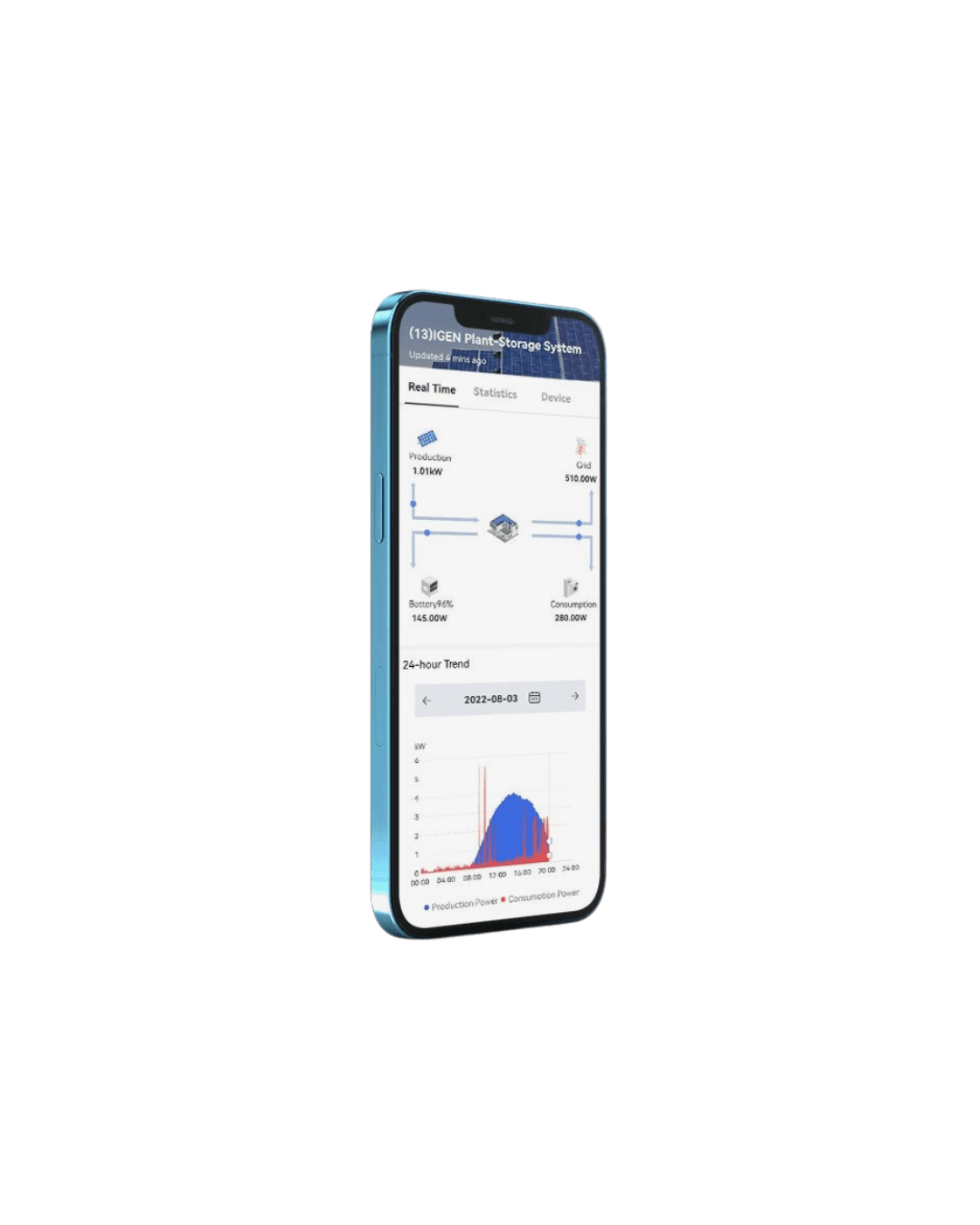
The Deye Cloud app connects directly to your inverter and shows:
- Real-time solar production
- Household consumption
- Battery activity (if installed)
- Grid import and export
Think of it as your energy dashboard for your home.
The Main Screen: Understanding Energy Flow
When you open the app, you’ll see a live energy flow diagram.
This is the most important screen.
It shows how electricity is moving between:
- Solar panels
- Your home
- The battery
- The grid
How to read it:
- Solar → Home = you’re using free solar energy
- Solar → Battery = storing energy for later
- Solar → Grid = excess energy exported
- Grid → Home = you’re buying electricity
Your goal is simple:
Use as much of your own solar energy as possible.
The Key Numbers (What Actually Matters)
Inside the app, you’ll see several metrics. Focus on these:
1. PV Production (kWh)
How much energy your panels are generating.
2. Load / Consumption (kWh)
How much your home is using.
3. Grid Import / Export
- Import = buying electricity
- Export = sending energy back
4. Battery Level (%)
How full your battery is.
5. Self-Consumption
Not always shown directly, but critical:
The more solar you use yourself, the more you save.
Understanding Your Battery Behaviour
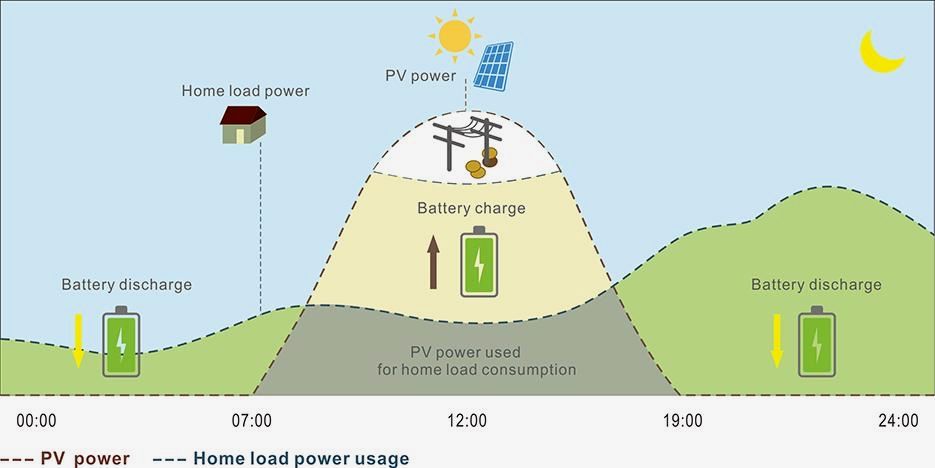
If you have a battery, your system typically works like this:
- Morning → Afternoon: battery charges from solar
- Evening: battery powers your home
- Night: battery may partially discharge
Important settings (usually installer-controlled):
- Minimum battery reserve (%)
- Charge/discharge priorities
- Time-of-use settings (in some cases)
If these aren’t set correctly, your savings can drop — so it’s worth checking.
Daily vs Monthly Views
The app allows you to view:
- Daily performance
- Monthly totals
- Historical data
What matters most:
- Daily: good for spotting obvious issues
- Monthly: best for understanding savings
Don’t worry if numbers fluctuate day to day — solar depends on weather.
Common Mistakes to Avoid
Here’s what we see most often with DEYE users:
1. Watching the App Too Closely
Solar performance changes constantly — zoom out and look at trends.
2. Confusing Export with Savings
Exporting energy is usually less valuable than using it yourself.
3. Ignoring Timing of Usage
Running appliances at night = more grid usage
Running them during the day = more savings
4. Battery Misconfiguration
Incorrect settings can lead to:
- Battery not discharging properly
- Unnecessary grid usage
How to Get More Value from Your System
Once you understand the app, you can actively improve your savings:
Shift usage to daytime:
- Washing machine
- Dishwasher
- Pool pumps
- EV charging
Use your battery effectively:
- Let it charge fully during the day
- Use it in the evening when electricity is expensive
Monitor trends (not moments):
Weekly and monthly patterns matter most
What “Normal” Looks Like
A well-functioning DEYE system should:
- Produce energy every sunny day
- Show clear energy flows
- Charge and discharge the battery daily
- Reduce your grid usage significantly
If this is happening, your system is working properly.
When to Contact Sol Viva
Get support if you notice:
- No production on sunny days
- Battery stuck or not charging
- Constant grid usage despite sunshine
- App offline or not updating
Final Thoughts
Your DEYE app might feel technical at first, but it’s actually a powerful tool.
Once you understand it, you can:
- Take control of your energy
- Increase your savings
- Feel confident your system is working properly
And that’s exactly what solar should give you, control and clarity.
Here's a useful video that gives you a general flyby of the SOLARMAN App.
Need Help Getting the Most from Your Solar?
At Sol Viva, we don’t just install systems, we help you get the maximum return from them.