
How to Use Your Huawei or Fronius Solar App: A Simple Homeowner’s Guide


If you’ve recently installed solar, one of the first things you’ll notice is the app.
It looks impressive, graphs, flows, numbers, but for most homeowners, it’s not immediately obvious what it all means.
This guide will walk you through the essentials so you can quickly understand:
- What your system is doing
- Whether it’s performing properly
- How to get the most value from your solar investment
Why Your Solar App Matters
Your solar app isn’t just “nice to have” — it’s your window into how your home uses energy.
Most modern systems (whether Huawei or Fronius) allow you to:
- Monitor production and consumption in real time
- Track savings and grid usage
- Adjust battery behaviour (if installed)
- Identify issues early
In fact, these apps are designed to give homeowners full visibility and control from anywhere.
The Home Screen: Your System at a Glance
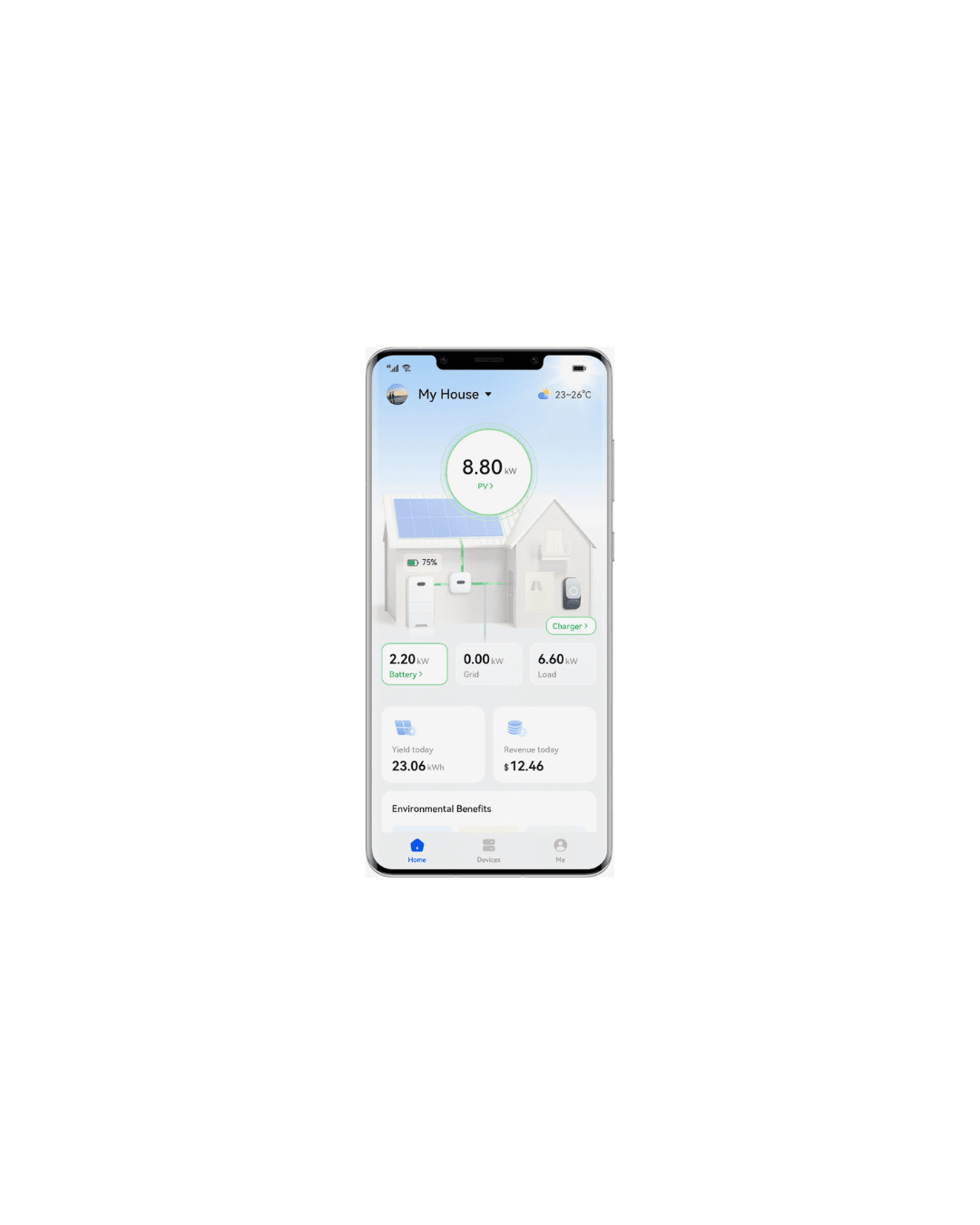
When you open your app, you’ll usually see a live energy flow diagram.
This shows how electricity is moving between:
- Solar panels
- Your home
- The battery (if you have one)
- The grid
What to look for:
- Solar → Home = you’re using your own energy (ideal)
- Solar → Battery = storing energy for later
- Solar → Grid = exporting excess
- Grid → Home = importing electricity (costing you money)
Your goal: maximise solar usage in your home before exporting or importing.
Key Numbers You Should Understand
Most apps show similar core metrics:
1. Production (kWh)
How much energy your panels generate.
2. Consumption (kWh)
How much energy your home uses.
3. Self-Consumption (%)
The percentage of solar energy you use directly.
Higher = better savings
4. Grid Import / Export
- Import = energy you buy
- Export = energy you sell (or give away cheaply)
5. Battery State of Charge (SOC)
How full your battery is (if installed)
These metrics are standard across solar platforms and help you understand performance and savings
Understanding Your Battery (If You Have One)
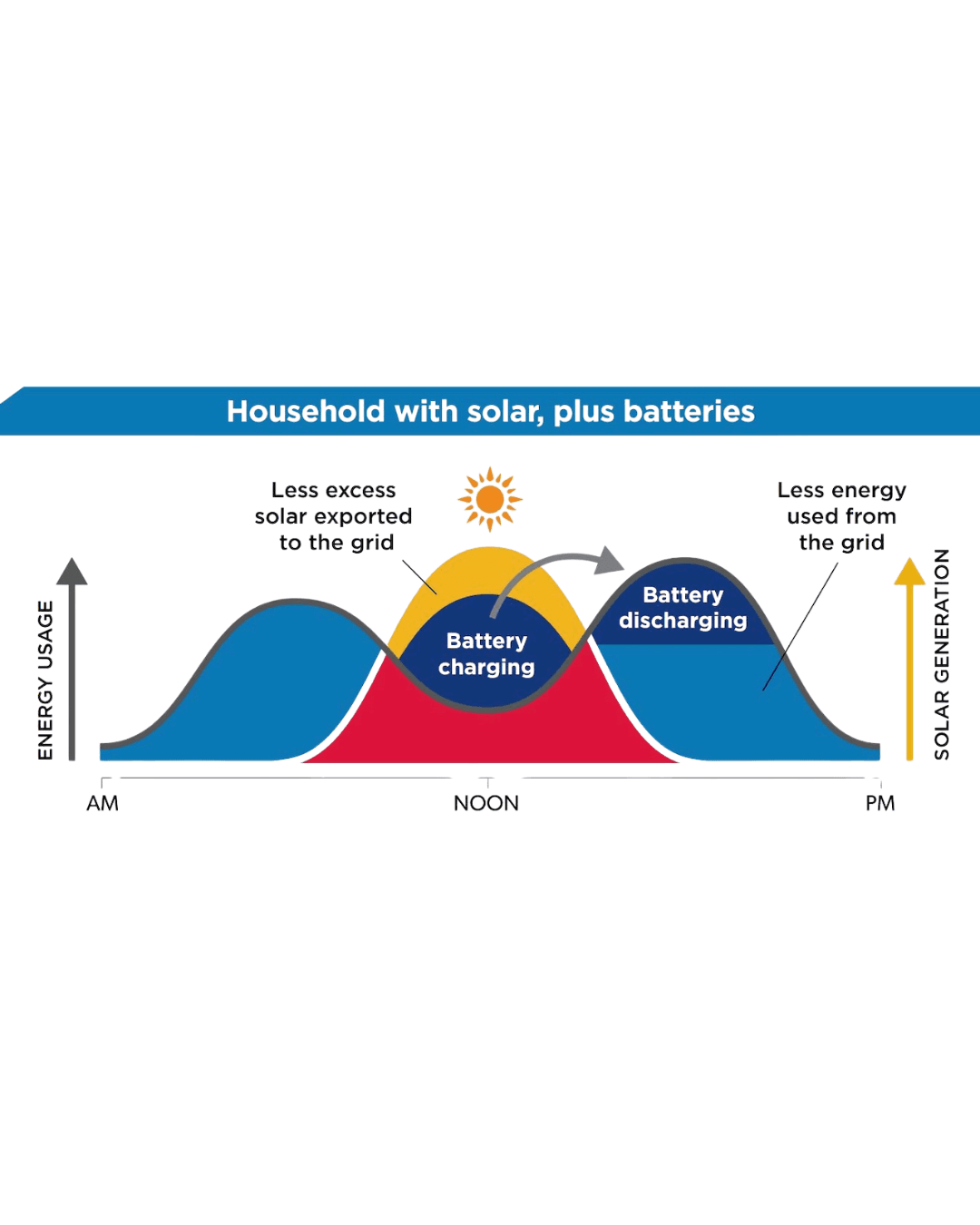
Your battery typically follows a simple pattern:
- Daytime: charges from solar
- Evening: powers your home
- Night: may partially discharge depending on settings
Important settings:
- Minimum reserve (%) → protects battery life
- Mode (self-use / backup / export) → defines behaviour
For example:
- Self-use mode = maximise savings
- Backup mode = keep energy for outages
The Most Common Mistakes (and How to Avoid Them)
Based on real user feedback, many homeowners feel overwhelmed or unsure how to interpret the app
Here are the big ones to avoid:
1. Checking Too Often
Solar works best over days and weeks, not minutes.
2. Misreading Grid Usage
Seeing grid import occasionally is normal, especially at night or during high demand.
3. Ignoring Self-Consumption
This is the most important metric, not total production.
4. Not Using the Data
Your app should guide behaviour:
- Run appliances during the day
- Charge EVs when solar is high
- Avoid peak grid usage
What “Good Performance” Looks Like
As a simple benchmark:
- Spring/Summer: high production, high self-consumption
- Winter: lower production, more grid use
- Battery systems: reduced evening imports
If your system is:
- Producing energy daily
- Charging/discharging correctly
- Showing logical energy flows
Then it’s likely working exactly as it should.
When to Contact Sol Viva
You don’t need to worry about every number — that’s our job.
But get in touch if you notice:
- No production during sunny days
- Battery not charging or discharging
- Constant high grid import
- App showing errors or offline system
Final Thoughts
Your solar app might seem technical at first, but once you understand the basics, it becomes incredibly powerful.
It allows you to:
- Take control of your energy
- Reduce your bills
- Make smarter decisions about how and when you use electricity
And most importantly, it gives you confidence that your system is doing exactly what it should.
Need Help Understanding Your System?
At Sol Viva, we help homeowners in Portugal get the most out of their solar systems, not just install them.